H060 Form Elements
In this task, you need to create an HTML page where users can input data as shown:
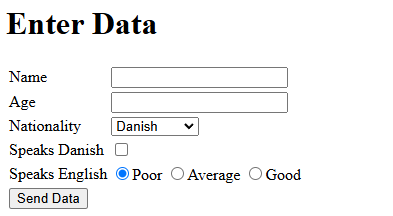
The data should be sent to https://reqbin.com/echo/post/form as a POST request. This page simply receives the data and displays success/failure.
REMEMBER – the page must validate against W3C. Use Live Server to preview the result.
See a possible solution
<!DOCTYPE html>
<html lang="en">
<head>
    <meta charset="UTF-8" />
    <meta name="viewport" content="width=device-width, initial-scale=1.0" />
    <title>Form</title>
</head>
<body>
    <h1>Enter Data</h1>
    <form action="https://reqbin.com/echo/post/form" method="post">
    <table>
        <tr>
        <td>Name</td>
        <td><input type="text" name="name" id="name" /></td>
        </tr>
        <tr>
        <td>Age</td>
        <td><input type="number" name="age" id="age" /></td>
        </tr>
        <tr>
        <td>Nationality</td>
        <td>
            <select name="nationality" id="nationality">
            <option>Danish</option>
            <option>Swedish</option>
            <option>Norwegian</option>
            </select>
        </td>
        </tr>
        <tr>
        <td>Speaks Danish</td>
        <td><input type="checkbox" name="speaksDanish" id="speaksDanish" /></td>
        </tr>
        <tr>
        <td>Speaks English</td>
        <td>
            <input
            type="radio"
            name="speaksEnglish"
            value="poor"
            checked="checked"
            />Poor
            <input type="radio" value="average" name="speaksEnglish" />Average
            <input type="radio" name="speaksEnglish" value="good" />Good
        </td>
        </tr>
        <tr>
        <td>
            <input type="submit" name="submit" value="Send Data" />
        </td>
        </tr>
    </table>
    </form>

    <hr />
    <h2>City Names</h2>
    <p>
    Just for information – if you want to create a dynamic list, programming
    on either the server or in the browser is necessary. Here is an example
    of code that retrieves postal codes from
    <a href="https://api.dataforsyningen.dk/postnumre">DAWA</a>. See the script
    and more in the source.
    </p>

    <div>
    <select id="postalCodes"></select>
    </div>
    <script>
    fetchData();
    async function fetchData() {
        let lst = document.getElementById("postalCodes");
        let response = await fetch("https://api.dataforsyningen.dk/postnumre");
        let data = await response.json();
        console.log(data);
        for (let index = 0; index < data.length; index++) {
        let o = document.createElement("option");
        o.innerText = data[index].nr + " " + data[index].navn;
        lst.appendChild(o);
        }
    }
    </script>
</body>
</html>