H050 Tables
Here you can practice using “table.”
- Create an
index.htmlwith a standard template (!+tab). - Add an h1 with the text “Table.”
- Add a table (
table) with three rows (tr) and three columns (th/td):- The first row should contain headers (
th) with months (January, February, etc.). - The next two rows should contain values (
td) [100, 50, 10] and [1000, 80, 1000].
- The first row should contain headers (
It should look like this:
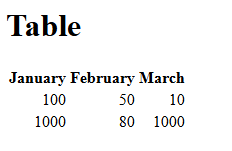
Optionally, try adding the attribute align="right" to all td elements – but typically, design would be managed using CSS.
REMEMBER – the page must validate against W3C. Use Live Server to preview the result.
See a possible solution
<!DOCTYPE html>
<html lang="en">
<head>
    <meta charset="UTF-8" />
    <meta name="viewport" content="width=device-width, initial-scale=1.0" />
    <meta http-equiv="X-UA-Compatible" content="ie=edge" />
    <title>Table</title>
</head>

<body>
    <h1>Table</h1>
    <table>
    <tr>
        <th>January</th>
        <th>February</th>
        <th>March</th>
    </tr>
    <tr>
        <td align="right">100</td>
        <td align="right">50</td>
        <td align="right">10</td>
    </tr>
    <tr>
        <td align="right">1000</td>
        <td align="right">80</td>
        <td align="right">1000</td>
    </tr>
    </table>
</body>
</html>