Overview of web development
This article provides an overview of web development, including the different roles in web development, the tools and technologies used by web developers, and the skills required to become a web developer. It is intended to serve as a guide for anyone interested in learning more about web development and the various aspects of the field. If you are new to web development, this article will help you understand the different roles and responsibilities in web development, the tools and technologies used by web developers, and the skills required to become a web developer. If you are already a web developer, this article will help you stay up-to-date with the latest trends and technologies in the field.
It is a living document that will be updated regularly to reflect the latest developments in the industry.
If you have any questions or suggestions, please feel free to reach out to me.
Roles in Web Development
Here is an outline of the different roles in web development:
The roles in web development are diverse and require different skills and expertise. Here are some of the most common roles:
- Web Designer
- Front-End Developer
- Back-End Developer
- Full Stack Developer
- SEO Specialist
- DevOps
Web Designer
A Web Designer focuses on the aesthetics and usability of a website. They are responsible for creating the design and layout of a web page or an entire website. This role involves understanding both graphic design and computer programming. Web designers work to create visually appealing sites that adhere to user experience principles, ensuring that the site is easy to navigate and aligns with the brand’s identity. They often use software like Adobe Photoshop, Illustrator, and wireframing tools.
UX and UI
UX, or User Experience, and UI, or User Interface, are two fundamental concepts in web design.
User Experience (UX) is about the overall experience a user has while interacting with a website or application. It involves understanding the user’s needs and expectations, and ensuring that the website is easy to use, efficient, and enjoyable. UX designers focus on creating a seamless, intuitive interaction between the user and the product, and often use techniques like user research, wireframing, and usability testing.
User Interface (UI), on the other hand, is about the visual elements of a website or application - the colors, typography, buttons, images, and layout. UI designers are responsible for designing each screen or page with which a user interacts, ensuring that the UI visually communicates the path that a UX designer has laid out. They focus on aesthetics and visual interactivity, choosing color schemes and button shapes that look great and work well.
In essence, UX makes interfaces useful, while UI makes interfaces beautiful. Both are crucial to a product and work closely together. While they are different disciplines, a good web designer will have an understanding of both.
Front-End Developer
A Front-End Developer is responsible for implementing the visual elements that users see and interact with in a web application. They are experts in HTML, CSS, and JavaScript, and they work to translate the web design into a functional website. Front-end developers must also ensure that the site is responsive, meaning it adjusts seamlessly to various screen sizes and devices. They often work closely with web designers to bring their designs to life.
Back-End Developer
A Back-End Developer focuses on the server-side of web applications. They manage the database and server logic, ensuring that the data and services required by the front-end system are delivered efficiently and securely. This role involves programming in languages like Python, Ruby, PHP, Java, or .NET, and working with databases such as MySQL, MongoDB, or SQL Server. Back-end developers are responsible for creating the backbone that allows a web application to operate.
Full Stack Developer
A Full Stack Developer has expertise in both front-end and back-end development. They are capable of developing a complete web application from start to finish. This role requires a wide range of skills, from HTML/CSS to server-side languages and database management. Full Stack Developers have a holistic view of web development projects, understanding how every part of the web development process fits together.
SEO Specialist
An SEO Specialist is responsible for optimizing a website to rank higher in search engine results. They work to improve the visibility of a website in search engines like Google, Bing, and Yahoo. This role involves understanding search engine algorithms, keyword research, and on-page and off-page optimization techniques. SEO specialists often work closely with web designers and developers to ensure that a website is optimized for search engines.
DevOps
DevOps is a set of practices that combines software development (Dev) and IT operations (Ops). It aims to shorten the development life cycle and provide continuous delivery with high software quality. DevOps engineers work closely with both development and operation teams to facilitate better communication and collaboration. Their role often involves automating and optimizing processes, managing infrastructure, ensuring security, and deploying technologies to support both front-end and back-end systems.
Tools for all roles
Here are some of the most popular tools used by web developers:
Code Editor
A Code Editor is a text editor that is optimized for writing and editing code. It provides features such as syntax highlighting, code completion, and code formatting. Some popular code editors include Visual Studio Code, Sublime Text, Atom, and Notepad++, but most developers have their own preferences.
Web Browser
A Web Browser is a software application used to access information on the World Wide Web. It renders web pages and displays them on the user’s device. Some popular web browsers include Google Chrome, Mozilla Firefox, Safari, and Microsoft Edge. Web developers often use multiple browsers to test their websites and ensure cross-browser compatibility.
Terminals
A Terminal is a command-line interface that allows users to interact with the operating system. It provides a text-based interface for executing commands and managing files and directories. Some popular terminals include Git Bash, iTerm2, Hyper, and Windows Terminal. Web developers often use terminals to run commands, manage projects, and deploy applications.
Version Control
Version Control is a system that records changes to a file or set of files over time. It allows developers to track changes to a project and to collaborate with other developers. Some popular version control systems include Git, SVN, and Mercurial.
Containerization
Containerization is a type of virtualization that allows multiple applications to run on the same operating system. It is often used to improve the performance of a web application and to reduce costs. Some popular containerization tools include Docker, Kubernetes, and Mesos.
Tools and technologies for designers
Wireframing Tools
Wireframing Tools are used to create wireframes, which are low-fidelity mockups of a web page or application. They allow designers to quickly visualize the layout and structure of a website without worrying about the details. Some popular wireframing tools include Balsamiq, Sketch, Figma, and Adobe XD.
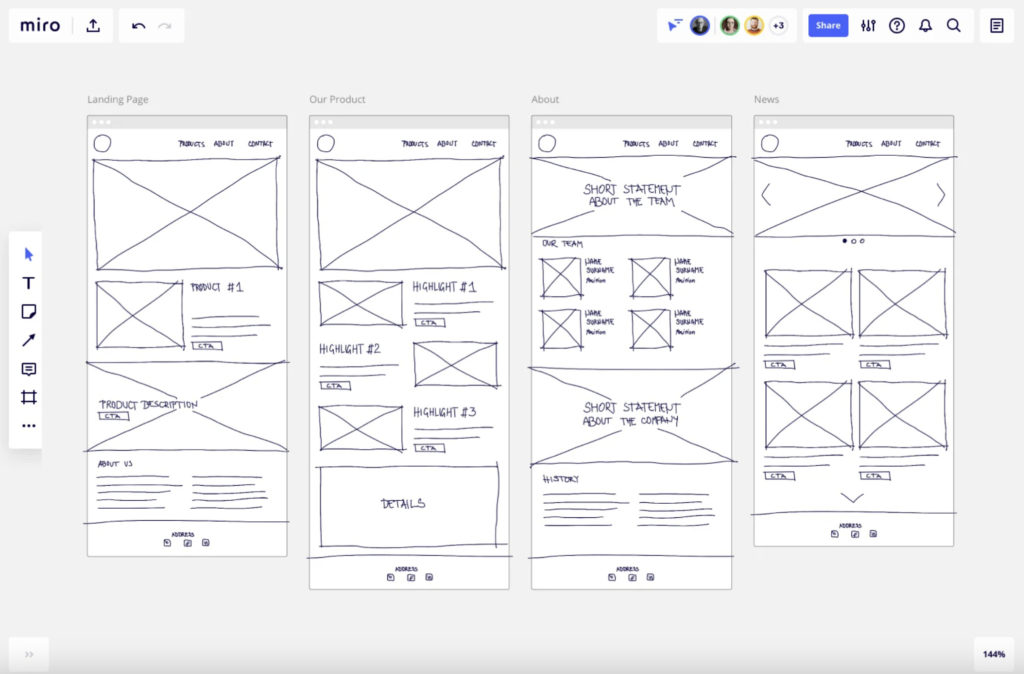 Source: Low fidelity wireframe on Miro
Tools and technologies for front-end developers
Apart from a deep knowledge of HTML and CSS, here are some of the most popular tecnologies and tools used by front-end developers:
HTTP
HTTP is a protocol used to transfer data over the web. It is the foundation of data communication on the World Wide Web and is used to request and transmit web pages, images, and other resources. HTTP is the most widely used protocol on the internet and is supported by all web browsers.
HTTPS
HTTPS is a secure version of HTTP that uses encryption to protect data transmitted over the web. It is often used to secure sensitive information, such as passwords and credit card numbers. HTTPS is the most widely used protocol for secure communication on the internet and is supported by all modern web browsers.
HTML
HTML is a markup language used to create the structure of a web page. It defines the elements and content of a web page, such as headings, paragraphs, images, and links. HTML is the foundation of every web page and is used to create the structure of a website.
HTML Example
<!DOCTYPE html>
<html lang="en">
<head>
    <meta charset="UTF-8">
    <meta name="viewport" content="width=device-width, initial-scale=1.0">
    <title>Simple HTML Example</title>
</head>
<body>

    <!-- Header -->
    <h1>My Simple Page</h1>

    <!-- Text Content -->
    <p>This is a paragraph of text in my simple HTML page. Here, you can introduce the topic or purpose of the page.</p>

    <!-- Button -->
    <button type="button">Click Me!</button>

</body>
</html>
Markdown
Markdown is a lightweight markup language used to format text. It is often used to write documentation and README files. Markdown is easy to read and write, making it a popular choice for writing documentation. It is also supported by many popular tools, including GitHub, Slack, and Trello.
Markdown Example
Some tools makes it possible to convert Markdown to HTML.
CSS
CSS is a style sheet language used to define the appearance of a web page. It defines the layout, colors, fonts, and other visual aspects of a web page. CSS is used to make web pages look good and is often used in conjunction with HTML.
CSS Example
body {
  font-family: Arial, sans-serif;
  background-color: #f0f0f0;
}

h1 {
  color: #333;
}

p {
  color: #666;
}
CSS Frameworks
CSS Frameworks are pre-written CSS code that can be used to style a web page. They provide a set of rules and guidelines for creating consistent designs across multiple pages. Some popular CSS frameworks include Bootstrap, Tailwind CSS, Materialize CSS, Foundation, and Bulma.
Bootstrap Example
<!DOCTYPE html>
<html lang="en">
<head>
    <meta charset="UTF-8">
    <meta name="viewport" content="width=device-width, initial-scale=1.0">
    <title>Bootstrap Example</title>
    <!-- Bootstrap CSS -->
    <link href="https://stackpath.bootstrapcdn.com/bootstrap/4.5.2/css/bootstrap.min.css" rel="stylesheet">
</head>
<body>

<!-- Navigation Bar -->
<nav class="navbar navbar-expand-lg navbar-light bg-light">
  <a class="navbar-brand" href="#">Navbar</a>
  <button class="navbar-toggler" type="button" data-toggle="collapse" data-target="#navbarNav" aria-controls="navbarNav" aria-expanded="false" aria-label="Toggle navigation">
    <span class="navbar-toggler-icon"></span>
  </button>
  <div class="collapse navbar-collapse" id="navbarNav">
    <ul class="navbar-nav">
      <li class="nav-item active">
        <a class="nav-link" href="#">Home <span class="sr-only">(current)</span></a>
      </li>
      <li class="nav-item">
        <a class="nav-link" href="#">Features</a>
      </li>
      <li class="nav-item">
        <a class="nav-link" href="#">Pricing</a>
      </li>
    </ul>
  </div>
</nav>

<!-- Grid Layout -->
<div class="container mt-4">
    <div class="row">
        <div class="col-md-4">
            <h2>Column 1</h2>
            <p>Some text here...</p>
        </div>
        <div class="col-md-4">
            <h2>Column 2</h2>
            <p>Some text here...</p>
        </div>
        <div class="col-md-4">
            <h2>Column 3</h2>
            <p>Some text here...</p>
        </div>
    </div>
</div>

<!-- Bootstrap JS, Popper.js, and jQuery -->
<script src="https://code.jquery.com/jquery-3.5.1.slim.min.js"></script>
<script src="https://cdn.jsdelivr.net/npm/@popperjs/core@2.5.2/dist/umd/popper.min.js"></script>
<script src="https://stackpath.bootstrapcdn.com/bootstrap/4.5.2/js/bootstrap.min.js"></script>
</body>
</html>
Tailwind Example
<!DOCTYPE html>
<html lang="en">
<head>
    <meta charset="UTF-8">
    <meta name="viewport" content="width=device-width, initial-scale=1.0">
    <title>Tailwind CSS Example</title>
    <!-- Tailwind CSS CDN -->
    <link href="https://cdn.jsdelivr.net/npm/tailwindcss@2.2.19/dist/tailwind.min.css" rel="stylesheet">
</head>
<body class="m-8">

    <!-- Header -->
    <header class="text-center mb-4">
        <h1 class="text-3xl font-bold">Tailwind CSS Example</h1>
    </header>

    <!-- Responsive Grid of Cards -->
    <div class="grid md:grid-cols-3 gap-4">
        <!-- Card 1 -->
        <div class="bg-white shadow-md rounded-lg p-4">
            <h2 class="text-xl font-semibold mb-2">Card Title 1</h2>
            <p class="text-gray-700">This is a simple card with some text to show how to use Tailwind CSS for styling.</p>
        </div>

        <!-- Card 2 -->
        <div class="bg-white shadow-md rounded-lg p-4">
            <h2 class="text-xl font-semibold mb-2">Card Title 2</h2>
            <p class="text-gray-700">Another example card with placeholder content to demonstrate layout with Tailwind CSS.</p>
        </div>

        <!-- Card 3 -->
        <div class="bg-white shadow-md rounded-lg p-4">
            <h2 class="text-xl font-semibold mb-2">Card Title 3</h2>
            <p class="text-gray-700">The third card in our grid layout, showcasing responsive design with Tailwind CSS.</p>
        </div>
    </div>

    <!-- Button -->
    <div class="text-center mt-8">
        <button class="bg-blue-500 hover:bg-blue-700 text-white font-bold py-2 px-4 rounded">
            Click Me
        </button>
    </div>

</body>
</html>
Traditional CMS
CMS stands for Content Management System. It is a software application used to create and manage digital content. It allows users to create, edit, and publish content on the web. Some popular CMS include WordPress, Drupal, and Joomla.
You can easily try a CMS in Docker - for example, Wordpress or Drupal.
Headless CMS
Headless CMS is a type of CMS that provides a back-end system for managing content, but does not provide a front-end interface. It allows developers to build their own front-end applications using the content stored in the CMS. Some popular headless CMS include Builder, Contentful, Strapi, and Sanity.
Some headless CMS are cloud-based with free tiers - like Builder and Sanity.
JSON
JSON is a lightweight data-interchange format. It is often used to store and transmit data between a server and a web application. JSON is easy to read and write, making it a popular choice for storing data.
JSON Example
{
  "people": [
    {
      "id": 1,
      "name": "Alice",
      "isStudent": true,
      "birthday": "1990-01-01"
    },
    {
      "id": 2,
      "name": "Bob",
      "isStudent": false,
      "birthday": "1985-05-23"
    },
    {
      "id": 3,
      "name": "Charlie",
      "isStudent": true,
      "birthday": "1992-11-30"
    }
  ]
}
XML
XML is a markup language used to store and transmit data. It is often used to store data in a structured format. XML is easy to read and write, making it a popular choice for storing data.
XML Example
<people>
  <person>
    <id>1</id>
    <name>Alice</name>
    <isStudent>true</isStudent>
    <birthday>1990-01-01</birthday>
  </person>
  <person>
    <id>2</id>
    <name>Bob</name>
    <isStudent>false</isStudent>
    <birthday>1985-05-23</birthday>
  </person>
  <person>
    <id>3</id>
    <name>Charlie</name>
    <isStudent>true</isStudent>
    <birthday>1992-11-30</birthday>
  </person>
</people>
Static Site Generators
Static Site Generators are tools that generate static HTML files from templates and content. They are often used to create blogs and documentation sites. Some popular static site generators include Jekyll, Hugo, Gatsby, and Next.js.
Its very easy to get started - for example, with Hugo.
Web Components
Web Components are a set of web platform APIs that allow you to create new custom, reusable, encapsulated HTML tags to use in web pages and web apps. Custom components and widgets can be built using HTML, CSS, and JavaScript. Some popular web component libraries include webcomponents.org, LitElement, Stencil, and Polymer.
Web Component Example
See https://www.webcomponents.org/element/@polymer/paper-button for a simple example of a web component. And here is a simple example of a dice web component you can try out:
```html
<!DOCTYPE html>
<html lang="en">
  <head>
    <meta charset="UTF-8" />
    <meta name="viewport" content="width=device-width, initial-scale=1.0" />
    <title>Dice-webcomponent</title>
  </head>
  <body>
    <h1>Simple demo of a web component</h1>

    <cronberg-dice></cronberg-dice>
    <cronberg-dice cheat="true" backgroundcolorsix="green" forgroundcolorsix="white"></cronberg-dice>

    <script src="https://devcronberg.github.io/WebComponentDemo/dice.js"></script>

  </body>
</html>
SASS and LESS
SASS, LESS, PostCSS are CSS preprocessors that extend the functionality of CSS. They allow developers to use variables, mixins, functions, and other features that are not available in CSS. SASS and LESS are often used to make CSS code more maintainable and reusable.
SASS Example
// Define variables
$primary-color: #333;
$text-color: #777;

// Mixin for text styling
@mixin text-style($color) {
  color: $color;
  font-size: 16px;
  line-height: 1.5;
}

// Using variables and nesting in SASS
body {
  font-family: 'Helvetica', sans-serif;
  background-color: $primary-color;

  h1, h2 {
    @include text-style($text-color);

    &.highlight {
      color: lighten($text-color, 20%);
    }
  }
}
Compiled to CSS:
body {
  font-family: 'Helvetica', sans-serif;
  background-color: #333;
}

body h1, body h2 {
  color: #777;
  font-size: 16px;
  line-height: 1.5;
}

body h1.highlight, body h2.highlight {
  color: #999;
}
In modern web development, SASS is more popular than LESS - and many uses PostCSS or native CSS with custom properties (variables).
JavaScript
JavaScript is a programming language used to create interactive web pages. It is used to add dynamic behavior to web pages, such as animations, form validation, and interactive maps. JavaScript is the most popular programming language for front-end development and is used by 95% of all websites.
JavaScript Example
// Variable Declaration
let message = "Hello, World!";

// Function Definition
function displayMessage(msg) {
  console.log(msg);
}

// Class Definition
class Greeter {
  constructor(name) {
    this.name = name;
  }

  // Method to greet
  greet() {
    return `Hello, ${this.name}!`;
  }
}

// Using the variable and function
displayMessage(message);

// Using the loop to display numbers from 1 to 5
for (let i = 1; i <= 5; i++) {
  console.log(i);
}

// Creating an instance of the class and using it
let greeter = new Greeter("Alice");
console.log(greeter.greet());
TypeScript
TypeScript is a superset of JavaScript that adds static typing and other features to the language. It is used to create large-scale web applications and is often used in conjunction with JavaScript. TypeScript is a popular choice for front-end development because it provides better tooling and error checking than JavaScript.
TypeScript Example
// Interface definition
interface Person {
  name: string;
  greet(): void;
}

// Base class that implements the interface
class Employee implements Person {
  name: string;

  constructor(name: string) {
    this.name = name;
  }

  greet() {
    console.log(`Hello, my name is ${this.name}`);
  }
}

// Subclass that extends the base class
class Manager extends Employee {
  department: string;

  constructor(name: string, department: string) {
    super(name);
    this.department = department;
  }

  greet() {
    // Call the base class method
    super.greet();
    console.log(`I am the manager of the ${this.department} department.`);
  }
}

// Create an instance of Manager
const manager = new Manager('Alice', 'Engineering');
manager.greet();
Compiled to JavaScript
"use strict";
class Employee {
    constructor(name) {
        this.name = name;
    }
    greet() {
        console.log(`Hello, my name is ${this.name}`);
    }
}

class Manager extends Employee {
    constructor(name, department) {
        super(name);
        this.department = department;
    }
    greet() {
        super.greet();
        console.log(`I am the manager of the ${this.department} department.`);
    }
}

const manager = new Manager('Alice', 'Engineering');
manager.greet();
JavaScript Frameworks
JavaScript Frameworks are libraries that provide a set of tools and guidelines for building web applications. They make it easier to develop complex applications by providing ready-made solutions for common problems. Some popular JavaScript frameworks include React, Angular, Svelte and Vue.
These frameworks can create a SPA (Single Page Application), PWA (Progressive Web Application) or SSR (Server Side Rendered) application - or a combination of these.
JavaScript Libraries
JavaScript Libraries are collections of reusable code that can be used to add functionality to a web page. They are often used to add animations, form validation, and other features to a web page. Some popular JavaScript libraries include jQuery, Lodash, and Moment.js.
See examples of different web applications.
Testing Frameworks
Testing Frameworks are tools that make it easier to write and run tests. They provide a set of tools for writing tests, running tests, and reporting test results. Some popular unit testing frameworks include Jest, Mocha, and Jasmine, and some popular end-to-end testing frameworks include Playwright, Cypress and Puppeteer.
Node.js
Node.js is a JavaScript runtime that allows developers to run JavaScript on the server. It is often used to create web servers and to build back-end applications. Node.js is a popular choice for front-end development because it allows developers to use the same language on the front-end and back-end. It plays a big part in the development of modern web applications.
NPM and Yarn
NPM and Yarn are package managers for JavaScript. They are used to install, manage, and publish packages of code. They are often used to manage dependencies and to automate the build process. NPM is the default package manager for Node.js, and Yarn is a popular alternative.
Webpack and other bundlers
Webpack is a module bundler for JavaScript. It is used to bundle JavaScript files and other assets into a single file. It is often used to improve the performance of a web application and to reduce the number of HTTP requests. Webpack is a popular choice for front-end development because it provides better performance than other module bundlers.
Babel and other transpilers
Babel is a JavaScript compiler that is used to convert modern JavaScript code into a backward-compatible version of JavaScript. It is often used to improve the compatibility of a web application with older browsers. Babel is a popular choice for front-end development because it provides better compatibility than other transpilers.
Linters and formatters
Linters and formatters are tools that are used to enforce coding standards and best practices. They are often used to improve the quality of a web application and to reduce the number of bugs. Some popular linters and formatters include ESLint, Prettier, and TSLint.
A simple nodejs example
To create a simple Node.js application using an NPM package, we’ll make a small project that utilizes the axios package to make HTTP requests. Axios is a promise-based HTTP client for the browser and Node.js, and it’s perfect for making API calls.
-
Create a new directory for your project and navigate into it:
-
Initialize a new Node.js project:
This command creates apackage.jsonfile with default values.
Install axios by running:
Create a file named index.js in your project directory and add the following code:
const axios = require('axios');

async function fetchUserData() {
  try {
    const response = await axios.get('https://dawa.aws.dk/kommuner/');
    for (let i = 0; i < 5; i++) {
      console.log(response.data[i].navn);
    }
  } catch (error) {
    console.error('Error fetching data:', error);
  }
}

fetchUserData();
This script uses axios to fetch data from DAWA and logs the response to the console.
Run your application using Node.js:
You should see the output in your console.
A simple Express example
Setting Up Your Project
If you haven’t already, set up a new Node.js project:
This sequence of commands creates a new directory for your project, initializes a Node.js project with default settings, and installs Express.
Create a Basic HTML Page
Create a new file named index.html in your project directory (my-express-app). Open this file in a text editor and add some HTML content. Here’s a simple example:
<!DOCTYPE html>
<html lang="en">
<head>
    <meta charset="UTF-8">
    <meta name="viewport" content="width=device-width, initial-scale=1.0">
    <title>My Express App</title>
</head>
<body>
    <h1>Hello, Express!</h1>
    <p>Welcome to my simple Express website.</p>
</body>
</html>
Writing Your Web Server Code
Now, create or update the index.js file in your project directory with the following code:
const express = require('express');
const app = express();
const port = 3000;
const path = require('path');

// Define a route for GET requests to the root URL ('/')
app.get('/', (req, res) => {
  // Send the HTML file in response
  res.sendFile(path.join(__dirname, 'index.html'));
});

// Start the server
app.listen(port, () => {
  console.log(`Example app listening at http://localhost:${port}`);
});
This code serves your index.html file when a GET request is made to the root URL (/). It uses path.join to ensure the file path is correctly constructed across different operating systems.
Running Your Web Server
Run your server with the following command:
After executing the command, open a web browser and go to http://localhost:3000. You should see your HTML page rendered.
Tools and technologies for back-end developers
Apart from a deep knowledge of HTML, CSS and JavaScript, here are some of the most popular tecnologies and tools used by back-end developers:
Server-side languages
Server-side languages are programming languages that run on the server. They are used to create the logic and functionality of a web application. Some popular server-side languages include PHP, Python, Ruby, Java, and C#.
Server-side frameworks
Server-side frameworks are libraries that provide a set of tools and guidelines for building web applications. They make it easier to develop complex applications by providing ready-made solutions for common problems. Some popular server-side frameworks include Laravel, Django, Ruby on Rails, Spring, and ASP.NET.
WASM
WASM is a low-level programming language that can be used to create high-performance web applications. It is often used to create games and other applications that require high performance. WASM is a popular choice for back-end development because it provides better performance than JavaScript.
Rest APIs
Rest APIs are a type of API that uses HTTP requests to access and manipulate data. They are often used to create web services and mobile applications. They use HTTP methods such as GET, POST, PUT, and DELETE to perform CRUD operations on resources, and return HTTP status codes to indicate the success or failure of an operation. Try it out with Postman and httpbin.org or other online toole.
GraphQL APIs
GraphQL APIs are a type of API that uses a query language to access and manipulate data. They are often used to create web services and mobile applications. They use a query language to define the data that should be returned, and return JSON data in response to a query.
Databases
Databases are used to store data in a structured format. They are often used to store data for web applications and mobile applications.
Databases are divided into two main categories: SQL and NoSQL. SQL databases are relational databases that use a structured query language to manage data. NoSQL databases are non-relational databases that do not use a structured query language to manage data.
Some popular databases include MySQL, PostgreSQL, MongoDB, MS SQL, and Redis.
SQL
SQL is a programming language used to manage data in a relational database. It is used to create, read, update, and delete data in a database. SQL is the most popular database language and is used by 95% of all databases.
SQL Example
-- Create a table
CREATE TABLE people (
  id INT PRIMARY KEY,
  name VARCHAR(100),
  is_student BOOLEAN,
  birthday DATE
);

-- Insert data into the table

INSERT INTO people (id, name, is_student, birthday)
VALUES (1, 'Alice', true, '1990-01-01'),
       (2, 'Bob', false, '1985-05-23'),
       (3, 'Charlie', true, '1992-11-30');

-- Query data from the table

SELECT * FROM people;
Database ORMs
Database ORMs are libraries that provide a set of tools for interacting with a database. They make it easier to write database queries by providing an object-oriented interface for interacting with a database. Some popular ORMs include Dapper, Entiry Framework, Sequelize, Mongoose, and SQLAlchemy.
Authentication
Authentication is the process of verifying the identity of a user. It is often used to restrict access to certain resources and to provide personalized content. Some popular authentication methods include username/password, OAuth, and JWT.
Caching
Caching is the process of storing data in a temporary storage location. It is often used to improve the performance of a web application by reducing the number of database queries. Some popular caching solutions include Redis, Memcached, and Varnish.
Message Queues
Message Queues are used to send messages between applications. They are often used to decouple applications and to improve the performance of a web application. Some popular message queues include RabbitMQ, Kafka, and Amazon SQS.
Web Servers
Web Servers are used to serve web pages to users. They are often used to host web applications and to improve the performance of a web application. Some popular web servers include Apache, Nginx, and IIS.
WebSockets
WebSockets are a type of communication protocol that allows two-way communication between a client and a server. They are often used to create real-time applications and to improve the performance of a web application. Some popular WebSocket libraries include Socket.IO, SignalR, and SockJS.
Version Control
Version Control is a system that records changes to a file or set of files over time. It allows developers to track changes to a project and to collaborate with other developers. Some popular version control systems include Git, SVN, and Mercurial.
Git
Git is a distributed version control system. It is used to track changes to a project and to collaborate with other developers. It is the most popular version control system and is used by 95% of all developers.
GitHub
GitHub is a web-based hosting service for version control using Git. It provides a web-based interface for managing Git repositories and collaborating with other developers. It is the most popular Git hosting service and is used by 95% of all developers.
Tools and technologies for full-stack developers
A full-stack developer is someone who has expertise in both front-end and back-end development. They are capable of developing a complete web application from start to finish. This role requires a wide range of skills, from HTML/CSS to server-side languages and database management. Full Stack Developers have a holistic view of web development projects, understanding how every part of the web development process fits together.
Tools and technologies for DevOps
DevOps is a set of practices that combines software development (Dev) and IT operations (Ops). It aims to shorten the development life cycle and provide continuous delivery with high software quality. DevOps engineers work closely with both development and operation teams to facilitate better communication and collaboration. Their role often involves automating and optimizing processes, managing infrastructure, ensuring security, and deploying technologies to support both front-end and back-end systems.
Cloud Platforms
Cloud Platforms are used to host web applications and to manage infrastructure. They are often used to improve the performance of a web application and to reduce costs. Some popular cloud platforms include Amazon Web Services (AWS), Microsoft Azure, and Google Cloud Platform (GCP).
Infrastructure as Code
Infrastructure as Code is a type of software development that uses code to manage infrastructure. It is often used to automate the deployment of infrastructure and to improve the reliability of a web application. Some popular infrastructure as code tools include Terraform, Ansible, and Chef.
Containerization
Containerization is a type of virtualization that allows multiple applications to run on the same operating system. It is often used to improve the performance of a web application and to reduce costs. Some popular containerization tools include Docker, Kubernetes, and Mesos.
Scripting
Scripting is a type of programming language that is used to automate tasks. It is often used to automate the deployment of infrastructure and to improve the reliability of a web application. Some popular scripting languages include Bash, PowerShell, and Python.